
ComicZoom
spoercsdingsheComics
4.6465.00 Reviews
- Version
- 1.0.7
- Installs
- 100.00K
- Age Rating
- Everyone
Screenshots

Our Review of ComicZoom
 Analysis by Appyee
At home, a comic app can become a shared reading spot: one person looks for a new series, another wants a quick reread, and someone else may only be borrowing the phone for a few minutes. That makes the small practical questions matter as much as the library: whose reading history is on screen, what happens when someone else opens the app, and whether a title can be enjoyed away from a connection. My impression of ComicZoom is that it is most appealing when each reader treats it as a personal browsing and reading space, rather than assuming it will organize a household for them.
A shared screen works best with clear expectations
On a tablet or phone passed between people, a personalized home screen can be useful, but it can also make browsing feel less individual. Recommendations based on reading habits are convenient when one person uses the app consistently; when several people take turns, the suggestions may reflect a mixed set of tastes. I would treat them as prompts, not as a reliable account of what any one reader likes. Searching directly for a title is a better route when you already know what you want.
That distinction matters in an everyday situation such as a family waiting room or a long journey. One person might be reading a superhero story while another wants manga, and a shared device makes it easy to hand over the screen. Before doing that, I would agree on whether the next reader should continue browsing, choose a title independently, or leave the current reading session untouched. It is a simple habit, but it prevents one person’s search or progress from becoming confusing for the next.
Set boundaries before handing over the device
I would not assume that a shared-device setup automatically keeps readers’ activity separate. If a household needs distinct histories, private recommendations, or controlled access, it should check how the app behaves on the actual device before relying on it for that purpose. The practical test is straightforward: open the app, browse a little, close it, then let another household member open it and see what is visible. That tells you more than guessing from a shared home screen.
It is also worth deciding who handles purchases before anyone explores paid content. The app is free to install, while in-app items range from $14.99 to $199.99 each. I would keep purchase decisions with the person responsible for the device or account, rather than leaving a younger reader to interpret a payment prompt. This is not a reason to avoid browsing; it is a reason to make the household rule clear before a comic session turns into a spending decision.
Coordinate reading without turning it into a chore
Reading lists can help a household agree on what to try next, especially when people enjoy discussing the same series. I would use a list as a lightweight shortlist rather than a strict shared schedule: add possible reads, then let each person choose when to start. That keeps recommendations from becoming homework and gives a family a practical way to remember titles they want to revisit.
Comments and reviews may also make it easier to see how other readers respond to a comic, but I would not treat them as a substitute for deciding whether a story suits a particular person. In a shared setting, discussing a title aloud can be more useful than relying on someone else’s reaction. A quick “Would you like this kind of story?” is often a better filter than popularity alone, particularly when readers have very different tastes.
Age suitability still calls for a reader’s judgement
The app carries an Everyone age rating, which makes it broadly approachable, but I would still choose comics title by title for children. An app-level age label does not tell me whether every individual story fits a child’s reading level, interests, or family preferences. I would preview a comic before recommending it to a younger reader, then let them explore independently only when I am comfortable with the title.
The same caution applies to community activity. Comments and reviews can add useful context, but they are user discussion rather than a guarantee that every response will be suitable for every age. For a child using a shared phone, I would make clear whether they can read and post comments, and check the experience together first. That keeps the app’s social side from being mistaken for a curated reading guide.
Who will get the most from it at home?
This is a better fit for a household with at least one enthusiastic comic reader who likes browsing, making reading lists, and zooming in on artwork. It can also suit occasional readers who want to try digital comics without paying just to install the app. A person who enjoys discovering titles through recommendations may find the home screen a pleasant starting point, while a focused reader can use search to get to a known series more directly.
I would be more cautious if the main requirement is tight household separation, a carefully managed child experience, or a single purchase that unlocks everything. Paid content is part of the app’s model, and a free download should not be confused with unlimited access. If your household prefers buying individual comics through a familiar digital storefront or reading from files it already owns, a conventional comic reader may be a better match than an app built around browsing a library and optional purchases.
Why I would choose it over a basic reader—and when I would not
Compared with a simple file reader, ComicZoom is oriented toward finding and exploring comics inside the app, rather than merely opening a collection you already have. That distinction is helpful if discovery is part of the fun. A basic reader can be preferable if you want a plain shelf for your own files, fewer decisions about paid content, or a reading setup that does not depend on recommendations and community features.
Against other comic apps, the qualities that stand out here are the mix of browsing, reading lists, panel-by-panel viewing, and offline access. The trade-off is that features only help when they fit the way you read. Panel-focused viewing can make small details easier to follow on a phone, but readers who prefer seeing a full page at once may find it less natural. I would switch between approaches according to the artwork rather than insisting on one mode for every comic.
Small habits that make reading smoother
For a commute, I would choose what to read while connected and download it before leaving, rather than waiting until the signal is unreliable. Offline access is most useful when it is part of a little routine: pick a comic, confirm it is ready, then put the phone away until there is time to read. That makes the feature practical for travel without assuming that every title or every part of the app behaves the same way offline.
For artwork-heavy pages, I would try a quick zoom before committing to a reading mode. A phone can make a large page feel cramped, and magnification is useful for lettering or fine detail; on the other hand, repeatedly zooming and moving around can interrupt the rhythm of a scene. Panel-by-panel viewing may solve that for some comics, while a full-page view may preserve the composition better for others. The best choice depends on the page, not just the device.
I would also keep reading lists purposeful. A short list for “next to try” and another for a series already in progress is easier to use than collecting every interesting cover in one place. This is a practical workaround for the common problem of browsing endlessly and forgetting why a title caught your eye. If several people share the device, naming or organizing lists in a way everyone understands can make them more useful, provided the app’s available organization options suit your routine.
There is a good reason to pause before paying for premium access: first work out whether the comics you actually want are available in the way you expect, and whether you will read often enough to justify the cost. The app includes in-app purchases, with items priced from $14.99 to $199.99, so I would review each purchase carefully rather than treating “premium” as one simple, predictable fee. For casual readers, free options may be enough to decide whether the reading experience feels right.
For anyone asking whether it is suitable for an older phone, the stated minimum operating system is version 7.0. The current release is version 1.0.3, and the app is developed by spoercsdingshe. It is free to install and is listed for readers of all ages. Those details make it easier to judge basic compatibility and access, but they do not remove the need to check comic choices and spending boundaries at home.
The audience figures suggest that it has found a sizable group of readers: it has over 10,000 installs, a 4.7 average from around 1,300 ratings, and 145 written reviews. I see that as a useful sign of interest, not proof that every feature will suit every reader. The more important test is whether its discovery tools, reading options, and paid-content approach match your own habits.
One question I would settle before making it a household app is whether people want to share one device or use their own. A single device is convenient for casual browsing and passing a comic around, but it can blur preferences and make purchase boundaries important. Personal devices give each reader a more independent routine. If neither arrangement works well with the way your household uses apps, a simpler reader or separate storefronts may be less troublesome.
I would also decide what “offline reading” needs to mean for your plans. For a short commute, downloading ahead is a sensible precaution; for a trip, I would test the chosen comic before leaving rather than discovering at the last moment that I have not prepared it. That is a small step, but it turns a feature into a dependable routine and avoids relying on connectivity when it matters least.
When someone asks whether this is a good first comics app, my answer is yes if they want a guided place to browse and are comfortable making choices about optional purchases. It is less compelling for a reader who already has a carefully organized personal collection and only needs a no-frills viewer. Likewise, a parent looking for strong household controls should verify the experience directly instead of assuming that an all-ages app rating means every comic and interaction is automatically appropriate.
Those differences are why I would introduce it to a household with a short trial of actual use rather than a long list of promises. Let each reader search for one title, try a page at normal size and zoomed in, and see whether the reading flow feels comfortable. Then decide whether lists and recommendations are genuinely useful. That quick routine exposes the app’s real strengths for your family without committing to a paid option first.
Getting Started with ComicZoom
First things first, downloading and setting up the app was a breeze. Available on both Android and iOS, it's just a tap away in the app store. Once I had it installed, the clean and intuitive interface immediately stood out. I mean, who doesn't appreciate an app that's easy to navigate?
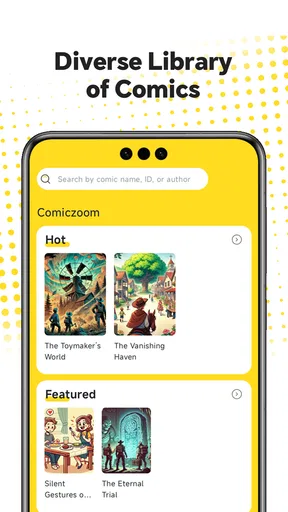
Upon opening the app, you're greeted with a visually appealing home screen showcasing popular and trending comics. It's like walking into a comic store where everything is laid out perfectly for you. The app's design feels modern, with vibrant thumbnails that are just begging to be explored.
Exploring the Comic Library
Now, let's talk about the heart of the app – its library. ComicZoom boasts an impressive collection of comics ranging from classic titles to the latest releases. Whether you're a fan of superheroes, manga, or indie comics, there's something here for everyone.
The search function is particularly efficient, allowing you to find your favorite titles in a jiffy. Plus, the app offers personalized recommendations based on your reading habits. It's like having a personal comic curator at your fingertips!
Reading Experience
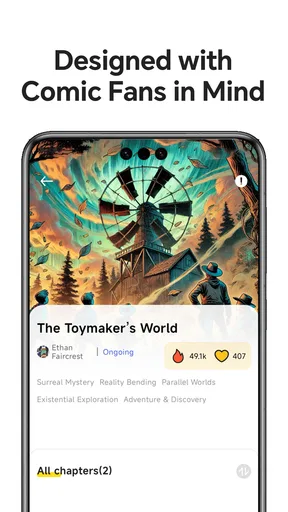
Reading comics on ComicZoom is an absolute delight. The app supports various reading modes, including a panel-by-panel view, which enhances the storytelling experience. It's perfect for when you want to savor every detail of the artwork.
The zoom feature is incredibly smooth, allowing you to dive into the tiniest details without losing clarity. And here's something I absolutely loved: the offline mode. You can download your favorite comics and read them anytime, anywhere – no internet required. It's a lifesaver for long flights or commutes.
User-Friendly Features
One of the standout features of ComicZoom is its user-friendly interface. The app's developers have clearly put a lot of thought into making navigation seamless. From organizing your library with custom categories to bookmarking your favorite panels, everything feels just right.
There's also a nifty feature where you can create reading lists. It's perfect for those weekends when you plan to binge-read an entire series. And if you're someone who likes to share your thoughts, the app allows you to leave comments and reviews on comics, creating a community of comic enthusiasts.
Subscription and Pricing
Let's talk about the money side of things. While ComicZoom offers a decent selection of free comics, the real treasure trove lies behind its premium subscription. For a monthly fee, you gain access to exclusive content, early releases, and some of the most sought-after titles in the comic world.
The subscription pricing is competitive, and honestly, given the vast library and features on offer, it's worth every penny. There's even a free trial period, so you can explore the premium features before committing.
In conclusion, ComicZoom is a fantastic app for both casual readers and hardcore comic fans. Its expansive library, coupled with an excellent reading experience, makes it a must-have on your device. Whether you're diving into the world of superheroes or exploring the latest indie releases, this app has got you covered. So, if you're ready to embark on a digital comic adventure, give ComicZoom a try. You won't regret it!
Verdict
Strengths of ComicZoom
- User-friendly interface for seamless navigation.
- Extensive library of popular and indie comics.
- Offline reading mode for convenience.
- Customizable viewing options enhance readability.
- Regular updates with new content and features.
Limitations of ComicZoom
- Occasional lag in loading high-resolution pages.
- Limited free content; subscription required.
- Ads can disrupt the reading experience.
- No option for family sharing on one account.
- Requires a stable internet connection for updates.
Other Releases by spoercsdingshe
View All
Manga Buz
Comics2.6
Similar Picks in This Category
View All
WEBTOON: Manga, Comics, Manhwa
NAVER WEBTOON4.6

MangaToon: Comic & Manga
MangaToon4.3

네이버 웹툰 - Naver Webtoon
NAVER WEBTOON4.3

Tapas – Comics and Novels
Tapas Entertainment Inc.4.2

Lezhin Comics - Daily Releases
LEZHIN ENTERTAINMENT3.3

WebComics - Webtoon & Manga
WEBCOMICS HOLDINGS HK LIMITED4.4
Frequently Asked Questions
What is ComicZoom and how does it enhance my comic reading experience?
ComicZoom is a versatile app designed to enhance your comic reading experience on Android and iOS devices. It offers high-resolution image support, customizable reading modes, and a vast library of comics across various genres. The app provides a seamless and immersive experience, allowing you to zoom in on panels without losing quality, making it ideal for both casual readers and comic enthusiasts.
Does ComicZoom offer any offline reading options?
Yes, ComicZoom allows users to download comics for offline reading. This feature is perfect for those who want to enjoy their favorite comics without needing a constant internet connection. Simply select the comics you wish to download, and they will be available in your library for offline access whenever you desire.
Are there any in-app purchases or subscription models within ComicZoom?
ComicZoom offers both free and premium content. While the app itself is free to download, it includes in-app purchases and a subscription model for accessing exclusive content and features. The subscription provides ad-free reading, early access to new releases, and discounts on purchases, enhancing your overall experience.
How user-friendly is the interface of ComicZoom for new users?
ComicZoom is designed with a user-friendly interface that caters to both new users and seasoned comic readers. The intuitive navigation and easy-to-use controls make browsing and reading comics a breeze. The app includes tutorials and tips to help new users get acquainted with its features quickly and efficiently.
Is ComicZoom compatible with multiple devices and platforms?
ComicZoom is available on both Android and iOS, ensuring compatibility with a wide range of smartphones and tablets. It also supports cloud synchronization, allowing you to save your progress and access your library across multiple devices. Whether you switch devices or use multiple platforms, your comic collection remains intact and up-to-date.
